


Service Assistance
Billing and Account
For questions regarding your account or information about products and services:
- Call our Business Specialist at (787) 717-9700
- Contact us via our contact form in Liberty Business
- Visit us our business portal
Repair & Troubleshooting
For technical support and assistance regarding your Puerto Rico services:
- Call our Network Operations Center at (833) 776-6200 / (787) 717-9900
- Check our trouble reporting and service support guide on our FAQs
Frequently Asked Questions
Still have questions? Check out our FAQs for answers.
- Contact the Network Operations Center (NOC) at (833) 776-6200 / (787) 717-9900 to report the incident.
- Please listen carefully to the IVR options to follow the proper reporting process.
- The NOC Technician will request the details of the situation, including:
- Circuit ID of the service provided
- Detail description of the current service situation
- Types of test perform to verify or isolate the condition
- Building access information
- After hours call back number, if applicable
- Address of affected outage or location
- The NOC Technician will determine whether a ticket already exists for the specific situation cause by a parent Network Incident or whether a new ticket needs to be opened for tracking and reporting purposes; in either case the ticket number will be given to the customer for case reference.
- The NOC Technician will evaluate/troubleshoot the situation and will direct/dispatch the ticket to the operations team if further test are needed for resolution of the case.
- Ticket escalation is automatic, if needed.
- The NOC and the Repair Teams will work hand to hand to solve the problem.
- Customer can review status of the case throughout to NOC IVR system contacting the (833) 776-6200 / (787) 717-9900 until case is resolved
- If the customer does not confirm that the trouble was not resolved satisfactorily, they should escalate using the official escalation list found on the Customer Portal
Ticket ETTR Priorities:
- Priority 1 (P1) = 4 hours ETTR* Services impact, meaning circuit down/ out of service
- Priority 2 (P2) = 6 hours ETTR* Circuit bounced, packet loss, latency, degradation, errors
- Priority 3 (P3) = 24 hours ETTR* Maintenance or Non service affecting
ETTR is Estimate Time to Repair: The time to fix an issue based on industry standards.
- Generally, escalations can be granted when a ticket is not being worked within the time intervals below.
- P1: Customer can start escalating after two (2) hour of ticket being opened.
- P2: Customer can start escalating after four (4) hours of ticket being opened.
- P3: Customer can start escalating after eight (8) hours of ticket being open, further intervals are negotiated with the customer.
*Please check your ticket ETTR for proper time escalation
| Level of escalation | Hours | Contact | Primary Contact Number |
| 1st Level of escalation | 0-2 | Network Operations Center Technician | 787 717-9900 |
| 2nd Level of escalation | 2-4 | Network Operations Center Managers | 787 523 1300 |
| 3rd Level of escalation | 4-5 | Area Manager Network Operations | 787 523 1302 |
Schedule Service & Maintenance Windows
If customer needs assistance or support from any of the Liberty Puerto Rico Operations team for a maintenance window, it will need to be coordinated within 10 business days prior the expected work day. The customer will be advice of the process and will need to open a ticket to log and record the support within the maintenance window.
Information needed:
- Type work, (relocation, addition etc)
- Type of support that will be required
- Technician will need to be on site or, support can be remotely provided
Customer will be advice of the cost/hr for technician support and the process to proceed with the assistance.
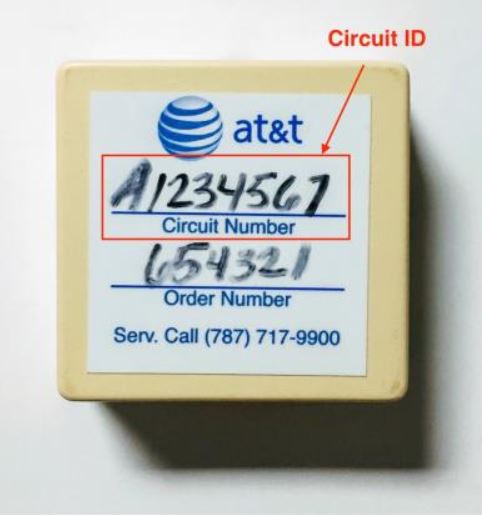
Circuit ID is a unique identifier
The Circuit ID is an identification provided by the Liberty Puerto Rico system of your service within our network structure. The Circuit ID is the identifier of the provided service and the specific configuration which was provided in the delivery. The ID is a key information when opening an incident report with our NOC or supporting teams. This ID can be located within the service delivery forms or in the final terminal service point in a small connector box. Here is a sample image on how its shown on the small connector box.
RFO - Reason for Outage/Incidents Report
The RFO is provided per trouble-ticket and is upon customer request. The RFO has a delivery period between 5 to 7 business days to properly research the case and provide the most accurate data possible to the customer. Customer can request a RFO after the case has been close/resolved to briefly outline the following things.
- Timeline of the outage
- Cause of the failure
- Short description of what has happened
- Actions and corresponding timestamps taken to resolve the issue
- Specific action items to work to prevent this from happening again
The RFO will depend in the final resolution of the case and if a trouble or event was found in the network or service. The RFO is not provided on cases of:
- No Trouble Found (NTF)
- Come Clear
- Service Recently Provision/New provision
- The MTTR (Mean Time To Repair) has to exceed 4 hours
The RFO can be requested through the Customer Account Mgr or directly to the email contact [email protected], please include case number for reference.